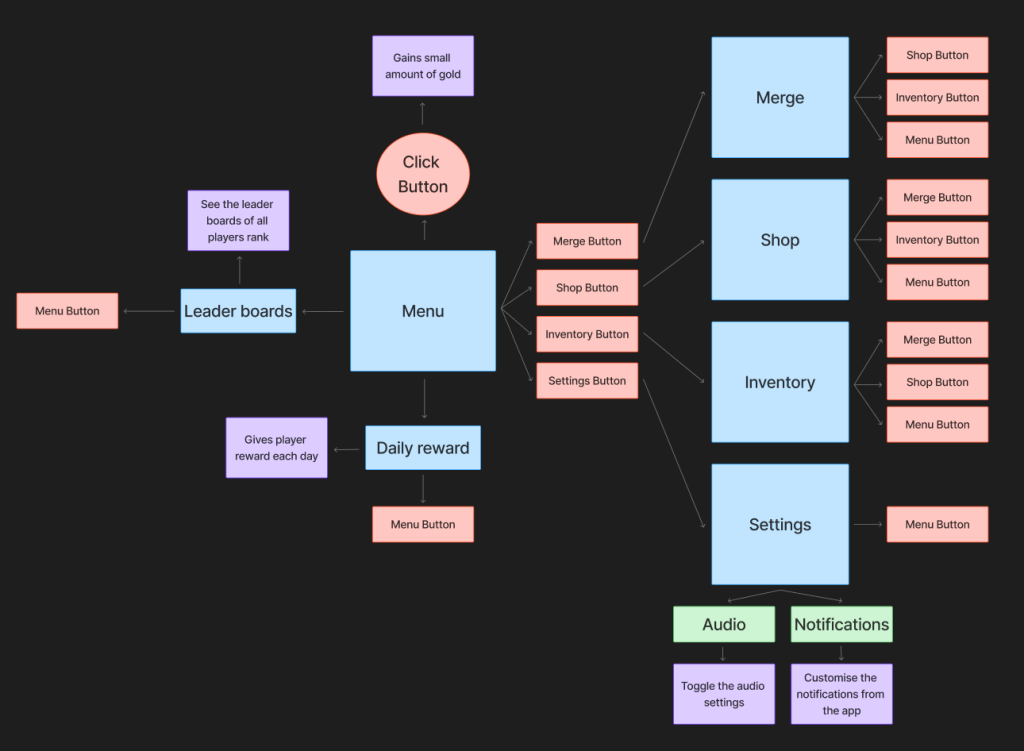
Menu additions
The menu additions i would like to use are the leader boards and daily reward as these are almost a must in each game and thought it would be a good addition in a mobile companion app as this would add extra rewards to the player
Settings
I think the settings feature is required in every app therefore I couldn’t go without adding it into mine
Menu
I have decided that for the menu I would like there to be all of the main pages featured on it as I would like to give the user a full range of freedom in which way they would like to go within the app. this also makes it much easier to navigate to each page of the app
Objective
The objective for the app is to help the player gain extra rewards without having to play the actual game, this will be done by pressing the click button on the main menu, this will work as a cookie clicker type of button adding small amounts of gold
Information
I have added the purple boxes in the UI wireframing to explain what each of these features will do in the game
Functions
The red boxes i have added are all of the click/press functions which the user can press in order to move into a different pager or section of the app
Pages I have added 7 different pages that the user can go into such as menu, merge, shop, inventory, settings, daily rewards and leader boards, all of these will be able to be accessed from the main menu and will have the ability to go back to the main menu with the main menu button as well as 3 other buttons for pages at the bottom for easier and faster access to a page